Firewalls and gateways
Receive syslog and IPFIX flows from your firewalls, declare devices, watch collection, authentication failures and threats.
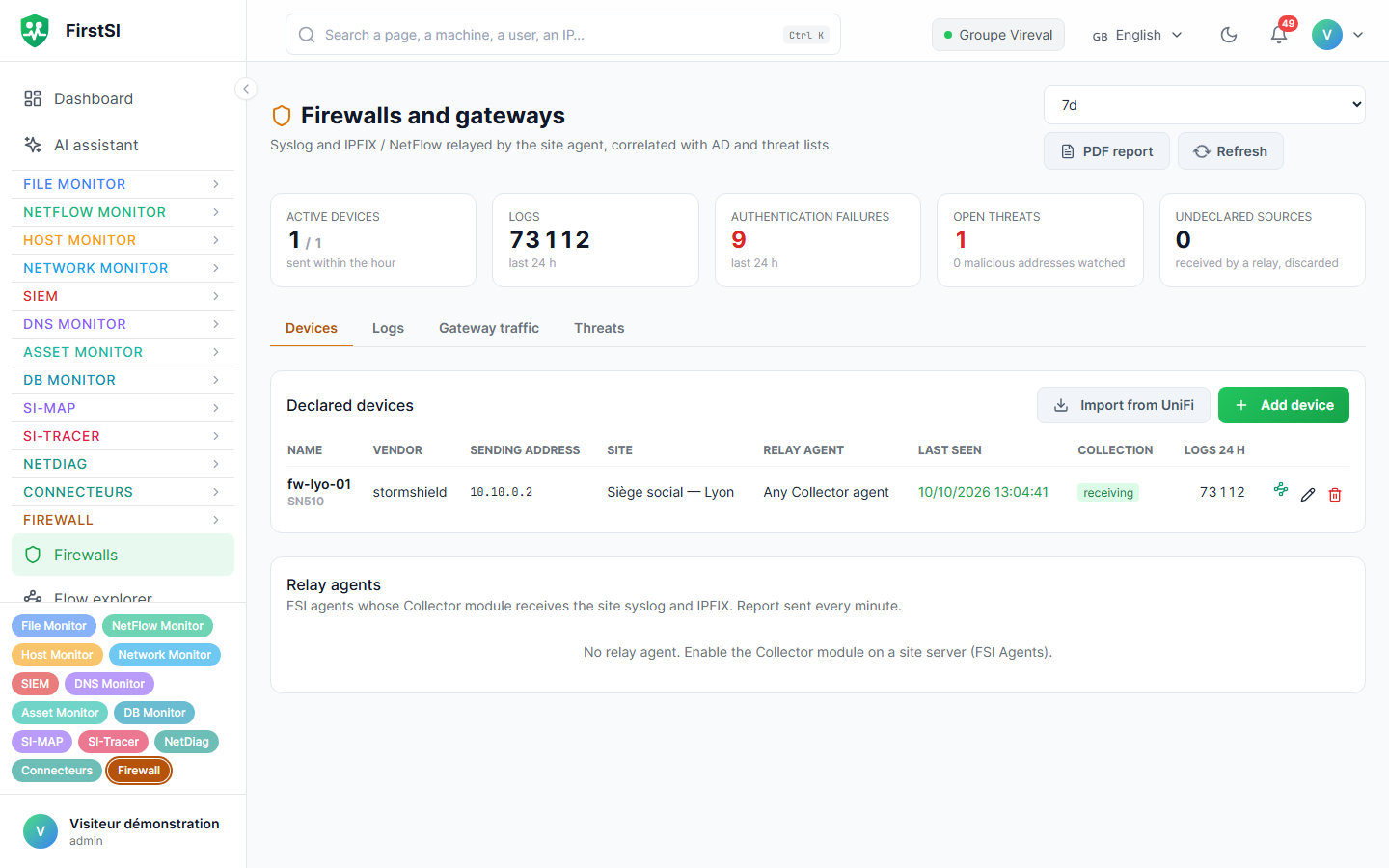
The Firewall module receives syslog messages and IPFIX / NetFlow v9 flows from your firewalls and gateways. They do not go straight to the server: they pass through an agent on the site, the relay agent (Collector module), which forwards them encrypted to FirstSI. Logs are then matched against the directory and against lists of malicious addresses.
Setting it up
- Pick the relay agent: a server on the site that is always on and that the device can reach.
- In the Devices tab, click Add device (or Import from UniFi) and fill in the name, vendor, model, Sending address (where the logs come from), site and Relay agent. The Collector module turns itself on for that agent.
- On the device, send syslog to the relay agent on UDP 514 and IPFIX flows to port 4739.
- Go back to the Devices tab: the Collection column should switch to receiving within a few minutes.
Only declared sources are relayed, and the agent only opens its ports in the Windows firewall for declared addresses. A device sending from an unknown address shows up under Undeclared sources, with a Declare button to attach it to an existing device or create a new one.
Supported formats are RFC 3164 and 5424 syslog, CEF, LEEF and key=value, with dedicated parsing for WatchGuard and UniFi. A message FirstSI cannot interpret is filed under Other; it is not lost. Beyond 6,000 messages per minute for one device, the excess is dropped and counted under Rate-limited.
Collection status
| Status | Meaning |
|---|---|
| receiving | Messages are arriving |
| quiet | Few messages, but the device is sending |
| interrupted | Unusual silence. The cause shown tells you where to look: relay agent, changed address, tunnel down or silent device |
| never received | Nothing has arrived since the device was declared |
The Relay agents block gives each relay's per-minute report: syslog, rate-limited, flows received, without template, errors.
The tabs
Logs can be filtered by period, category, action, device, user and IP address. A row's details show the Raw message and the directory account it was matched to. Explore these logs opens the Flow explorer.
Gateway traffic shows Volume per hour, Top talkers and Top destinations.
Threats lists contacts with malicious addresses, open or acknowledged, with an Acknowledge button and a link to the matching SIEM Incident.
The PDF report button in the header produces a summary over 24 h, 7, 30 or 90 days.
Detections
They are evaluated every 5 minutes over the last 30 minutes and open SIEM incidents:
| Rule | Severity | Trigger |
|---|---|---|
| FW-SPRAY | high | 3 or more accounts failing from the same public address (unless the address belongs to a campaign already reported) |
| FW-SPRAY-CAMPAGNE | high | 2 or more addresses from the same /24 range, or the same hosting provider, failing on 10 or more accounts: a single incident per campaign and per day |
| FW-BRUTE-SUCCESS | critical | Successful sign-in after at least 3 failures from the same address; only high if the address belongs to an Internet provider in your country |
| FW-SPRAY-DISTRIB | high | 8 or more accounts targeted from 5 or more addresses |
| FW-COMPTE-VERROUILLE | medium or high | A directory account is locked out; the incident names the real origin (see Account profile). High for a sensitive account (admin, install, test, service, backup…) or an origin that is a hosting provider or abroad. Requires SI-Tracer |
| FW-SPRAY-COMPTES-REELS | critical | The targeted accounts really exist in the directory |
| FW-ADMIN-CHANGE | low | Configuration changed on a device |
| FW-TUNNEL-DOWN | medium | Tunnel down for more than 5 min |
| FW-COLLECTE-INTERROMPUE | medium or low | More than 15 min of silence from a device that is usually chatty |
| FW-THREAT-IP | the indicator's | Traffic with a malicious address (lists reloaded every 30 min) |
The title of authentication incidents gives the country, the network operator and, where relevant, the word "hosting". Clicking an address opens its profile.
Retention
| Data | Duration |
|---|---|
| Logs and allowed traffic | 90 days |
| Gateway flows, per minute | 7 days |
| Gateway flows, per hour | 365 days |
| Threat matches | 365 days |
| Undeclared sources | 30 days |
If the customer's retention period is shorter, that one applies.
Frequently asked questions
No logs are coming in. Check the declared sending address and that the device's syslog really points at the relay agent on port 514. Then look at Undeclared sources: if the device is listed there, it is sending from a different address than the one declared.
An imported UniFi gateway has an address "to be confirmed". Attach it from Undeclared sources as soon as it starts sending.
I can't acknowledge a threat. You need to be an administrator, or to have been delegated firewall management.
Source: · FirstSI Docs · updated 2026-10-10