NetworkMonitor: sites, devices, tunnels
Inventory of sites and network devices, SD-WAN tunnels, WAN links, Wi-Fi, topology, host presence, open ports and alert rules.
NetworkMonitor brings together what your controllers and network devices know: Peplink InControl2 for SD-WAN, tunnels and WAN links, UniFi Site Manager for Wi-Fi, switches and gateways, and SNMP polling done by an agent.
Connecting the sources
In Providers (#/nm-providers), click Add Provider:
| Provider | What you need |
|---|---|
| UniFi | The API key from unifi.ui.com (Settings → API). Tick Auto-import devices |
| Peplink InControl2 | The API credentials. If InControl is hosted on your premises, tick On-Premise Server and give its address |
| SNMP, NetFlow/sFlow | An agent with the NetworkMonitor module (NETWORKMONITOR=true) |
Click Test Connection, then Force Sync. After that, synchronization runs every hour.
The screens
| Screen | Content |
|---|---|
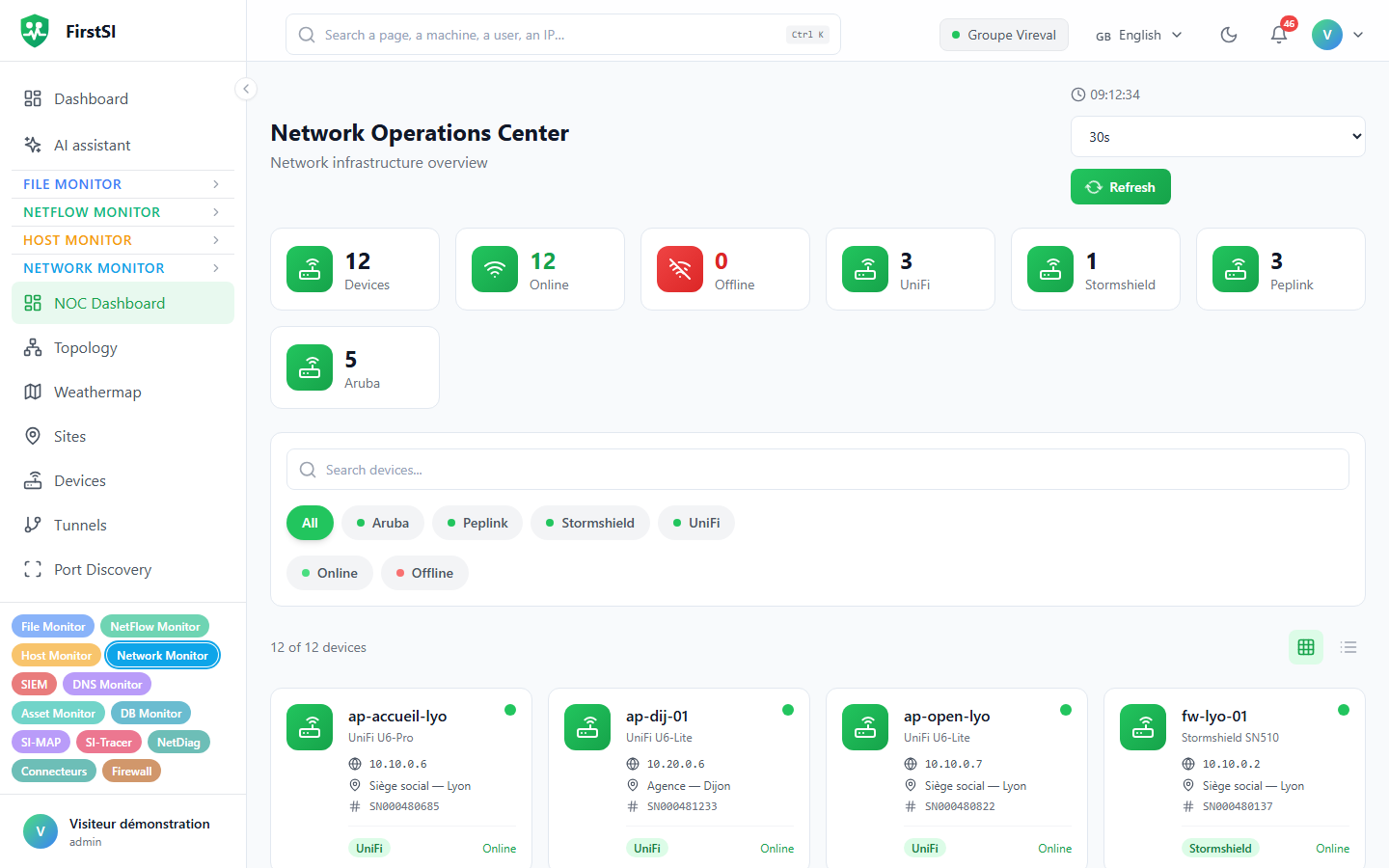
| NOC Dashboard | Sites, devices, tunnels, active and critical alerts |
| Topology, Weathermap | The map of links, coloured by load (green < 25%, yellow < 50%, orange < 75%, red above) |
| Sites, devices | The inventory. A device's page has Overview, Interfaces, Tunnels, WAN, WiFi and Metrics tabs |
| Tunnels | SpeedFusion, IPsec, WireGuard, Site Magic: latency, jitter, loss, throughput |
| ISP metrics | Internet access quality as seen by UniFi (5-minute steps over 24 h, hourly over 30 days) |
| Presence | Hosts online or offline, new hosts, IP or MAC changes |
| Discovery, Port Discovery, Port Rules | Device discovery on address ranges, open ports, drift from a baseline |
On a device's page: Poll Now, Mute Alerts (1 h, 4 h, 24 h, 1 week or permanent) and Edit Device (SNMP v1, v2c, v3).
Alert rules
Rules are created under Alerts → Rules (#/nm-alerts). All of them are evaluated every minute.
| Type | Fires when… | Default |
|---|---|---|
| Device Offline | a device is offline | for 15 min |
| Tunnel Down | a tunnel is down while its device is online | for 2 min |
| High Latency | the latency of a tunnel or WAN link is above the threshold | 100 ms for 5 min |
| Packet Loss | the packet loss of a tunnel or WAN link is above the threshold | 5% for 5 min |
| High Utilization | an interface stays loaded above the threshold | 80% for 10 min |
| Status Change | a device changes state | on every change |
For threshold rules, the value has to stay above the threshold for the whole configured duration: a single spike triggers nothing. As soon as the value drops back under the threshold, the alert resolves itself. Measurements older than 2 hours are ignored, so you are not alerted on data no collector updates any more.
Interface utilization is calculated by the SNMP collector from how the counters change between two polls. That rule therefore only applies to devices polled over SNMP.
Each rule has a severity (information, warning, critical), a repeat delay (1 to 1,440 min), an e-mail notification address and, if you want one, a reminder. A rule can be limited to certain device types or to one site. Only one alert stays open at a time per rule and per item, and devices whose alerts are muted are skipped.
On top of that come port alerts (new port, unauthorized port, closed, reopened) and presence alerts (host offline for more than 10 minutes).
AI assistant and Wi-Fi
The AI assistant can run a per-site Wi-Fi diagnosis from UniFi data: airtime usage per band, access points, channels, retransmissions, switch ports. Ask for instance "Wi-Fi diagnosis for the … site over 7 days".
Retention
Detailed metrics 30 days, ping results 7 days, resolved alerts 90 days, port history 30 days. Hourly aggregates are kept for at least 365 days.
Frequently asked questions
My UniFi devices don't show up. Check the API key and the Auto-import devices box, then run Force Sync.
A latency rule never fires. Check that the tunnels or WAN links concerned report a recent latency on their page. Without a measurement less than 2 hours old, the rule has nothing to evaluate.
Discovery doesn't start. The agent runs the scan at its next sync. If no range is entered, it uses the ones from its own configuration.
Source: · FirstSI Docs · updated 2026-10-10