AssetMonitor: inventory, vulnerabilities, licenses
Inventory of machines and software, known vulnerabilities (CVEs), end of support, actual software usage, license compliance and alerts.
AssetMonitor inventories your estate (machines, software, devices) and cross-checks it against known vulnerabilities, end-of-support dates, actual software usage and the licenses you bought.
You need the agent with ASSETMONITOR=true on workstations and servers. Network devices can be imported from CSV (Devices, then Import CSV).
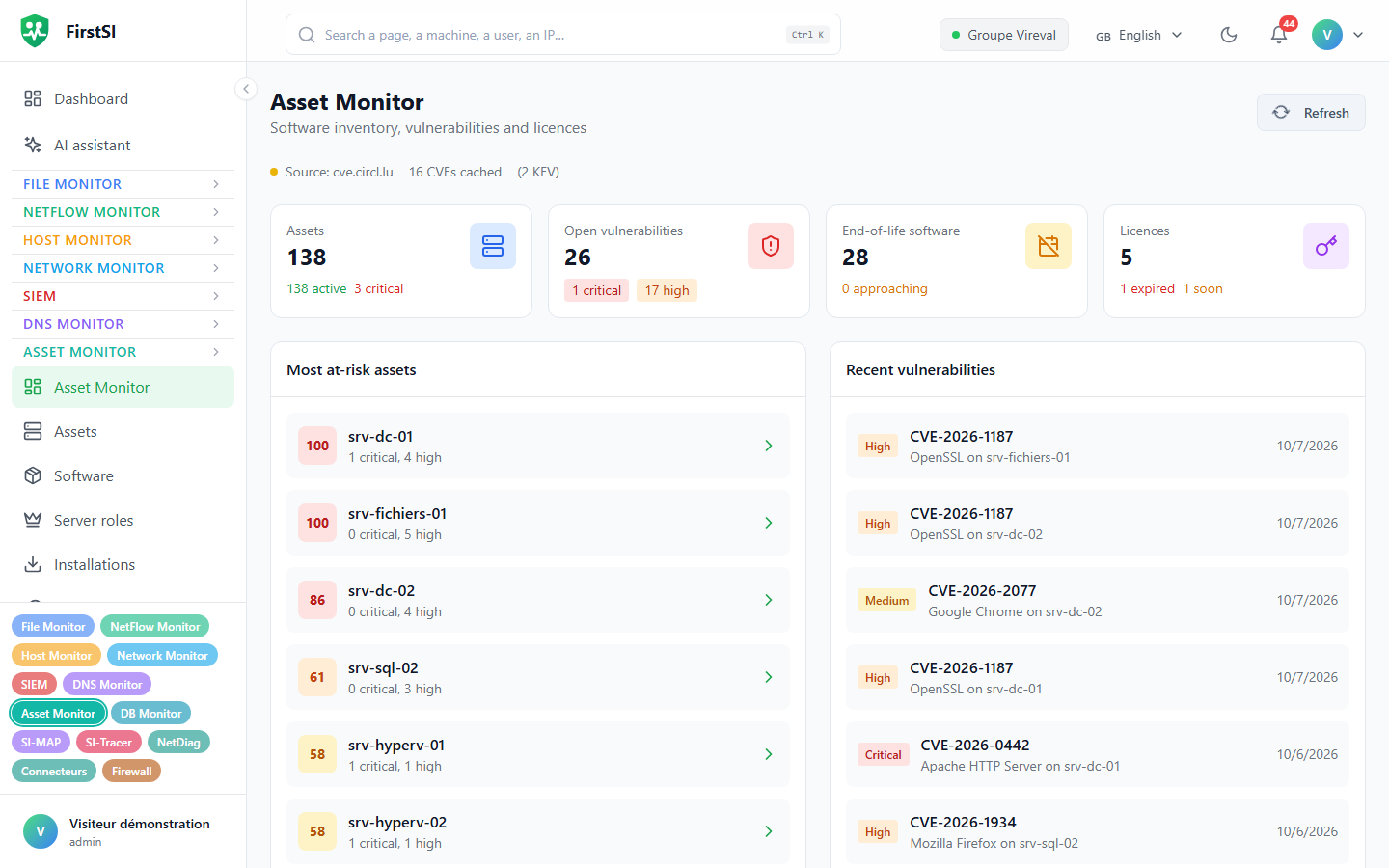
The screens
| Screen | Question |
|---|---|
| Dashboard | Where is the risk? Most exposed machines, recent vulnerabilities, software out of support |
| Assets and their page | What is on this machine? Software, CVE and History tabs |
| Software | Who installed what? Filters by category, CVE, end of support, vendor, license |
| Installations and updates | What changed, over 24 h to 90 days |
| Vulnerabilities | CVEs by severity, status (open, mitigated, resolved, accepted), machine, software |
| End of Life | Software and devices that have reached end of support, will soon, or are supported |
| Licenses, License Pools, Compliance | What you bought compared with what is installed |
| Software Usage | Hours of use, users, software never opened |
Vulnerabilities
CVEs are matched against the inventory every night at 03:30. Sources are queried in order (cve.circl.lu first, others as fallback, NIST NVD as an option) and actively exploited flaws (KEV) are flagged. A banner shows how fresh the data is. Its text is sent by the server and is still in French:
| Banner | Last sync |
|---|---|
| Données à jour (up to date) | less than 6 h ago |
| Synchronisation recommandée (sync recommended) | less than 24 h ago |
| Données obsolètes (out of date) | up to 72 h |
| Mode offline | more than 72 h |
An administrator can restart the sync with Sync now. An operator can change a CVE's status (mitigated, accepted…) to take it off the priority list.
A machine's risk score is critical from 80, high from 60, medium from 40. It is calculated from weights you can set in Settings: critical CVE, high CVE, medium CVE and software out of support.
End of support
Software is flagged Ending soon 90 days before its end-of-support date; that delay can be set from 30 to 365 days. Dates are synchronized automatically at the interval chosen in Settings (24 h by default), if automatic sync is ticked. Auto maintenance (administrators) cleans up duplicates, refreshes the dates and redoes the matching on demand.
Licenses
In License Pools, New Pool describes what you bought: quantity, type (perpetual, subscription, volume, site, per user, per CPU), costs, dates, contract, and the Software Pattern that recognises the software in the inventory (* stands for any sequence of characters). Reconcile counts the matching installs.
Compliance gives the compliance rate, pools at risk, upcoming expiries and under-used pools. Snapshot freezes the current state, which is useful for an audit.
| Pool state | When |
|---|---|
| Over-deployed | More installs than licenses bought |
| Under-utilized | Less than half of the licenses deployed |
For pools, expiry reminders come at 90 days (information), 30 days (warning) and 7 days (critical).
Actual usage
Software Usage measures hours of use per software and per person, and lists Unused Software for 30 to 180 days, a good way to recover licenses. A process FirstSI cannot tie to any software can be linked with Mappings, then Map, or ignored.
Alerts
AssetMonitor tells you when something new turns up:
| Switch in Settings | What is reported |
|---|---|
| Critical CVE detected | New critical CVEs on the estate |
| High CVE detected | New high-severity CVEs |
| End of life approaching | Software approaching or reaching end of support |
| Licence expired | Licenses that have expired or are about to |
| Over-deployed licence | Pools with more installs than licenses |
The check runs every 10 minutes. New items are grouped into a single notification per kind, shown in the console and written to the AssetMonitor log. Whatever already existed when the alerts were switched on is not reported, and nothing is reported twice.
The switches are set in Settings (#/am/settings, administrators); all of them are on by default. For an over-deployed pool, the alert must also be ticked on the pool itself.
Reports
Reports offers six PDFs: vulnerabilities, asset inventory, software inventory, end of life, license compliance, risk assessment. License Reports adds compliance (CSV), cost analysis and an audit report over a period.
Rights
Everyone can view assets, software, CVEs and end-of-support data, viewers included. Licenses, pools, compliance, usage, reports and changing a CVE's status require the operator role. Settings, creating and deleting, and starting syncs are for administrators.
Frequently asked questions
"Données obsolètes" banner. The last CVE sync is more than 24 hours old. Restart it, or check that the server can reach the sources.
How is a pool's "deployed" figure counted? It is the number of software entries in the inventory whose name matches the pool's Software Pattern.
I turned the alerts on and got nothing. That is expected at first: the first pass records what already exists without reporting it. Only what appears afterwards triggers a notification.
Source: · FirstSI Docs · updated 2026-10-10