API tokens
Create a token, use it, see what it has read, revoke it.
A token gives an external tool access to your customer's data, and only that customer's data. The access is read-only, plus a few targeted write operations if you grant them. A token can never be used to open a session in the console.
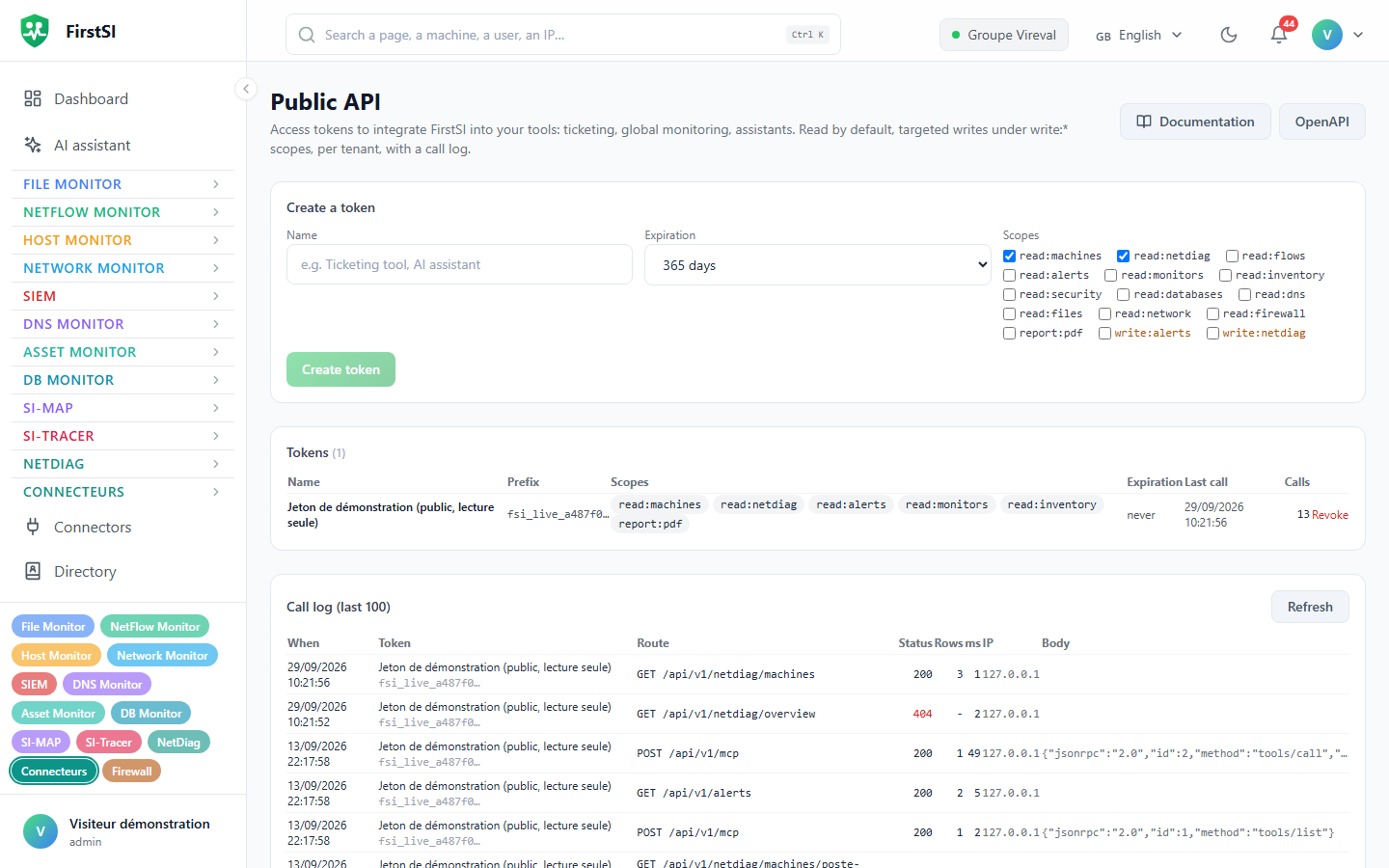
Create a token
- Open Public API (
#/api-tokens, in the Connectors group of the menu). The screen is reserved for the customer's administrators. - Give it a Name that says who uses it ("Ticketing tool", "General monitoring"…). That name appears in the call log.
- Tick the Scopes the tool needs, no more (see Token scopes).
read:machinesandread:netdiagare ticked by default. - Choose the Expiration: 90 days, 365 days (the default), 730 days or never.
- Click Create token. The token is shown once only: copy it straight into the tool that will use it.
A customer can have at most 20 active tokens.
A token starts with fsi_live_. After creation, the console only shows its first few characters, enough to recognise it.
Use it
Pass the token in the Authorization header of every call:
Authorization: Bearer fsi_live_xxxxxxxxxxxxxxxxxxxxxxxxxxxxxxxxxxxxxxxxFor tools that cannot set Authorization, the X-Api-Token: <token> header is accepted as well.
A missing, unknown, expired or revoked token gets 401, and so does any token when your customer account is disabled. A valid token that lacks the route's scope gets 403.
Track its use
For each token, the Public API screen shows its prefix, scopes, expiry, the Last call and the number of Calls. The Call log (last 100) lists the latest calls: date, method, route, response code, number of rows, duration and source address. For write calls, the body that was sent is kept.
Revoke
Click Revoke next to the token. It takes effect almost immediately: within a minute at most, the time it takes for the server's cache to clear. Revoke a token without delay if it may have been exposed (copied into a message, pushed to a code repository, visible in a screenshot), if its tool is no longer used, or if its owner has left the team.
A few good habits
One token per tool. With a shared token, the log no longer tells you who read what, and a revocation breaks every integration at once. Give trial tokens and contractors' tokens an expiry date. Grant as few scopes as possible; write:* scopes are for integrations that really need to act. Finally, keep the token in the tool's secret store (environment variable, secrets manager), not in plain text inside a script.
Source: · FirstSI Docs · updated 2026-10-10