3CX phone system
Connect the 3CX phone system read-only to see where an extension's calls go, monitor the trunks and the backup, and pre-diagnose telephony tickets.
FirstSI reads the 3CX phone system through its configuration API, read-only. Without opening the 3CX console, you can see where an extension's calls go depending on its status, what happens to an incoming number outside office hours, whether the carrier trunks are online and whether the backup has run. Pre-diagnostics uses it for tickets of the "telephony" type.
What FirstSI can read
| Subject | Content |
|---|---|
| System | Version, registered extensions out of the total, phone system services (stopped or not), last backup |
| Carrier trunks | Each trunk, online or not, number of simultaneous calls |
| Extensions | Phone registered or not, current status (Available, Away, Out of office…), and for each status where calls go on no answer, when busy or when the phone is not registered |
| Incoming numbers | Destination during office hours, outside them and on public holidays |
| Call queues | Agents of each queue, statistics over a period (calls received, answered) |
| Call log | Calls received or made by an extension, with the route of each call: inbound rule, forwarding, voicemail, transfer, who hung up |
| Audit log | Who changed the configuration, when, from which address and on which object |
| Other | Declared public holidays, event log, addresses blocked by the anti-hacking protection |
On the 3CX side: create the API client
In the 3CX management console, Integrations → API → Add:
- Enter a Client ID (a free number in the dial plan, usually 4 digits). Note it exactly as entered.
- Tick 3CX Configuration API Access.
- Choose the department and the role. To read every extension, the client must see all departments. Reports (call log, queue statistics, audit log) require the System Owner role; with a lower role, the configuration can be read but reports answer "access denied".
- Save, then copy the API key shown. It is not shown again.
On the FirstSI side: declare the connector
Connectors → New connector, type REST API:
| Field | Value |
|---|---|
| Name | a name containing "3CX": this is how pre-diagnostics recognises it |
| Base address | the address of the 3CX console, for example https://pbx.example.com |
| Authentication | Application identity → token (OAuth client_credentials) |
| Token address (https) | https://pbx.example.com/connect/token |
| Application ID (client_id) | the Client ID created above |
| Secret | the API key created above |
| Executing agent | an agent that can reach the phone system; none if the phone system is published on the Internet |
Queries call /xapi/v1/…. A list returns at most 100 rows per call, and the call log is read over a short period: 7 days at most.
Useful queries
Write them like any REST query (see Connectors), then test and approve them. A good starting set:
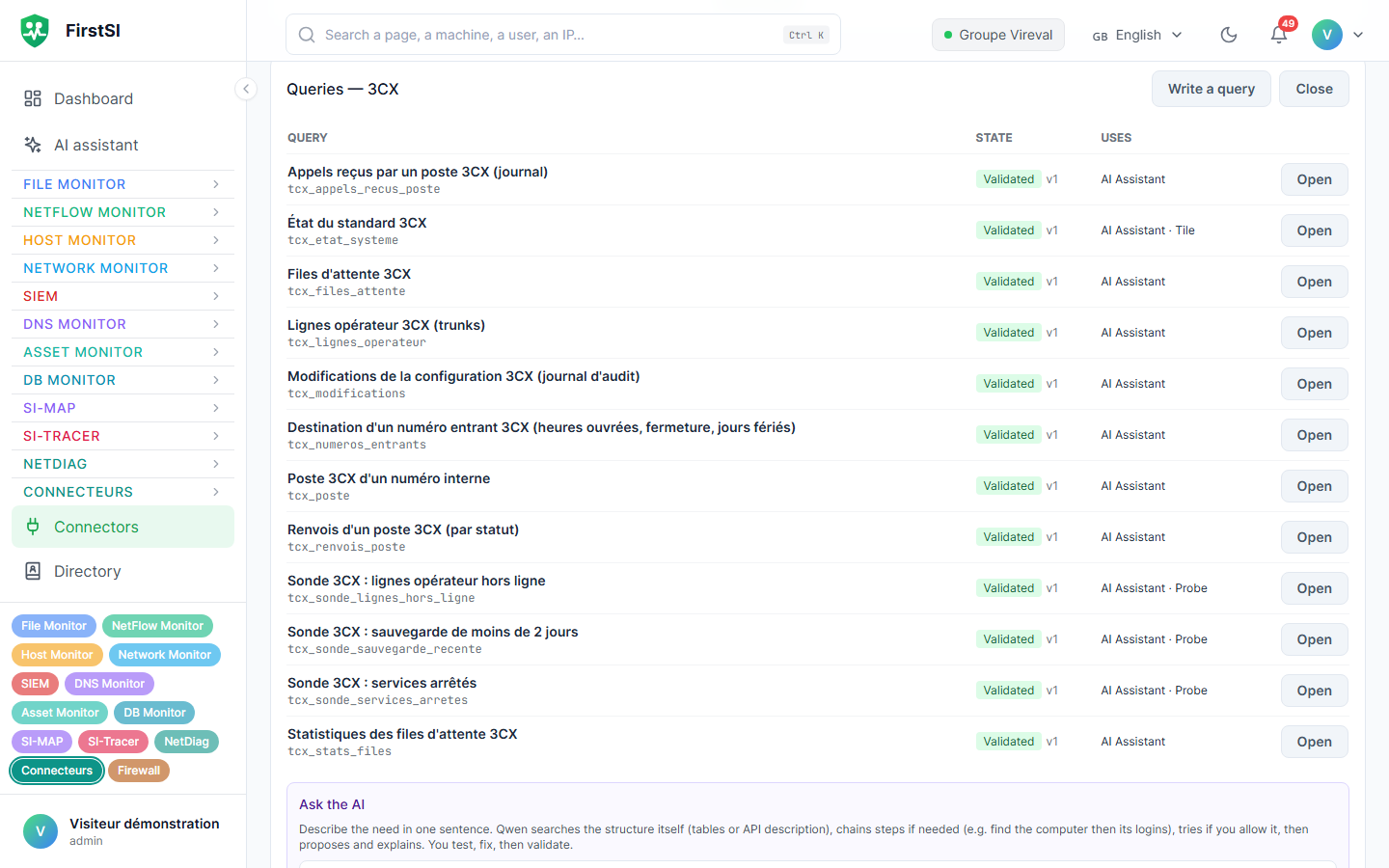
| Query | Parameters | Used for |
|---|---|---|
| System status | none | Registered extensions, services, version |
| Carrier trunks | none | Trunks that are offline |
| Backups | none | Date of the last successful backup |
| Extension details | extension number | Registration, current status |
| Extension forwarding | extension number | Where calls go for each status |
| Destination of a number | the last digits of the number | Open, closed, public holidays |
| Queues and agents | none or queue number | Who answers in each queue |
| Calls received by an extension | extension, start, end | Log with the route of each call |
| Extension statistics | extension, start, end | Received calls answered or not, outgoing calls, durations. Goes through the report of the extension's 3CX group: the 3CX per-extension report may answer "error 500" |
| Queue statistics | start, end | Calls received and answered per queue |
| Configuration changes | object (optional) | Who changed a forwarding rule or office hours |
Give each query a precise description: the AI Assistant reads it to pick the right one. Call logs contain phone numbers: tick Sensitive data (administrators only).
Recommended probes
| Probe | Normal if | Severity, frequency |
|---|---|---|
| Carrier trunks offline | no rows | critical, every 15 min |
| Phone system services stopped | no rows | critical, every 15 min |
| Last backup less than 2 days old | at least one row | warning, every 6 h |
In pre-diagnostics
The telephony type runs three checks when a 3CX connector exists:
| Check | What it says |
|---|---|
| Phone system status | Carrier trunks offline, stopped services, share of registered extensions, old backup |
| 3CX extension and forwarding | The extension quoted in the ticket, or failing that the requester's one, found from their email address in the directory: phone registered, current status and where its calls go in that status; calls received over 48 h, answered or not, and the route of the last missed call |
| Incoming number | The quoted number: its destination when open, closed and on public holidays, then the status and forwarding of the destination extension; duplicate rules are flagged |
A "my phone no longer rings" ticket thus arrives with the most common answer: the extension was left in Away status, and its calls are going to voicemail.
Frequently asked questions
The token is refused (401). The Client ID or the key does not match. Copy the ID exactly as shown in Integrations → API, regenerate the key on the 3CX side if needed and enter it again in the connector.
The configuration can be read, but reports answer 403. The API client does not have the System Owner role.
Queries fail from time to time with 401. Another tool uses the same API client and cancels FirstSI's token. Give it its own client.
The call log answers "error 500". The period is too long or the extension does not exist: narrow it down to a few days and check the number.
Source: · FirstSI Docs · updated 2026-10-10